
The queue and the player
Songs play in full, the queue follows you between devices, and Autoplay keeps the music going.
The player

- A song plays in full in the bar at the bottom of the screen (through a YouTube embed; a 30-second sample when no full version is found).
- Thumb up puts the song in your Favourites. Thumb down passes on it, takes it out of Autoplay, and skips to the next song.
- Stars, Add to playlist, Share and Pelt are on the bar too.
- On a computer the queue opens as a column on the right. When a video plays, drag the bar under it to make it bigger or smaller; the column widens for it, and gives the width back when the video shrinks.
The queue
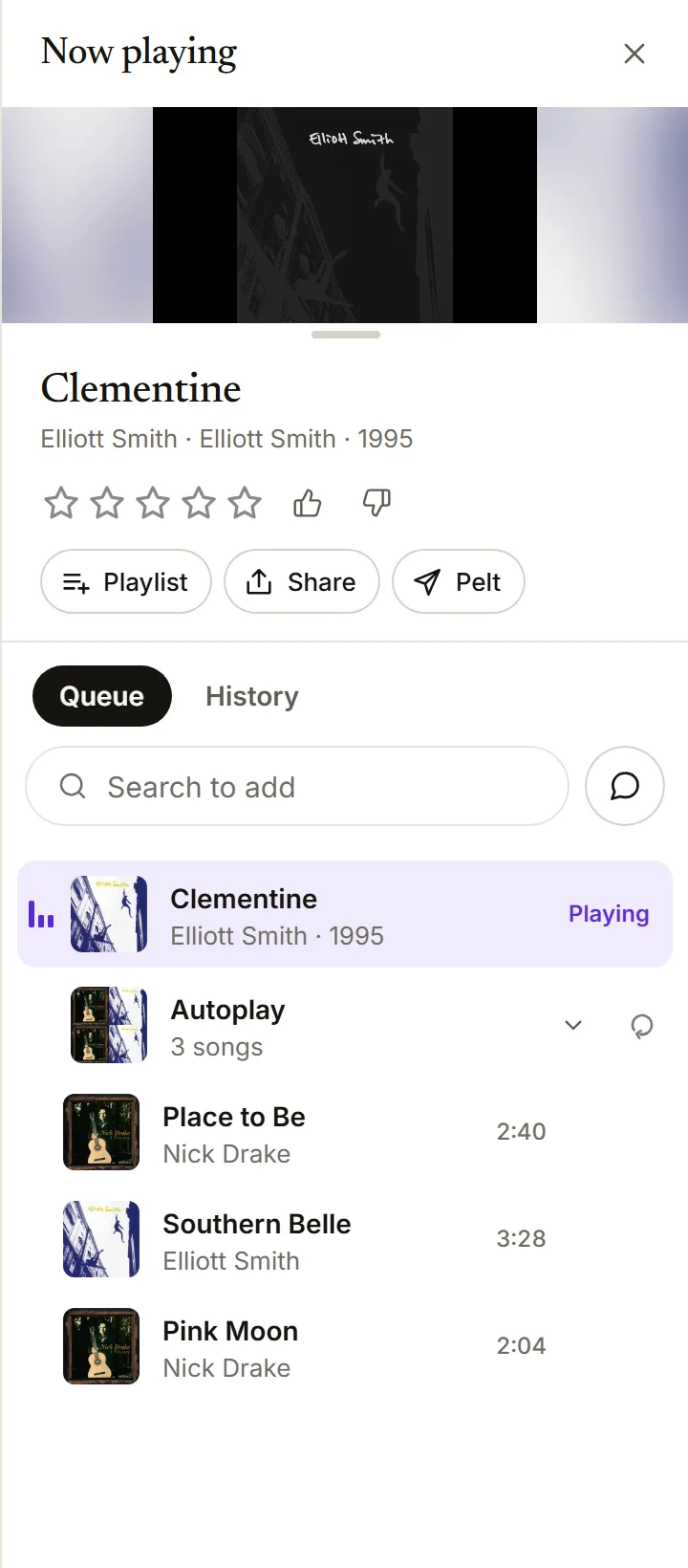
- Add to queue from any card, page or search result. Albums and lists come in as one folded row you can open.
- Drag to reorder, Shuffle, Clear.
- The queue is kept with your account, so it is the same on your phone and your computer.
- History lists what played, by day.
Autoplay
- When the queue runs out, Autoplay keeps going with songs that follow what you played.
- It shows the next three. Skip one and more come in.
- When you change the queue, Autoplay picks again from it by itself.
- What you do while listening teaches it: a rating, a thumb, a song put in a playlist.